Load the draft
Import the PDF and name its title, episode, revision set, date, and script start page.

Film script breakdown
Break down every scene for cast, sets, props, wardrobe, vehicles, background, department requirements, notes, and production tags.
Keep the shooting draft open beside the breakdown, mark the pages as you read, and carry what each department needs into the stripboard, sides, shot list, call sheet, and shoot day.
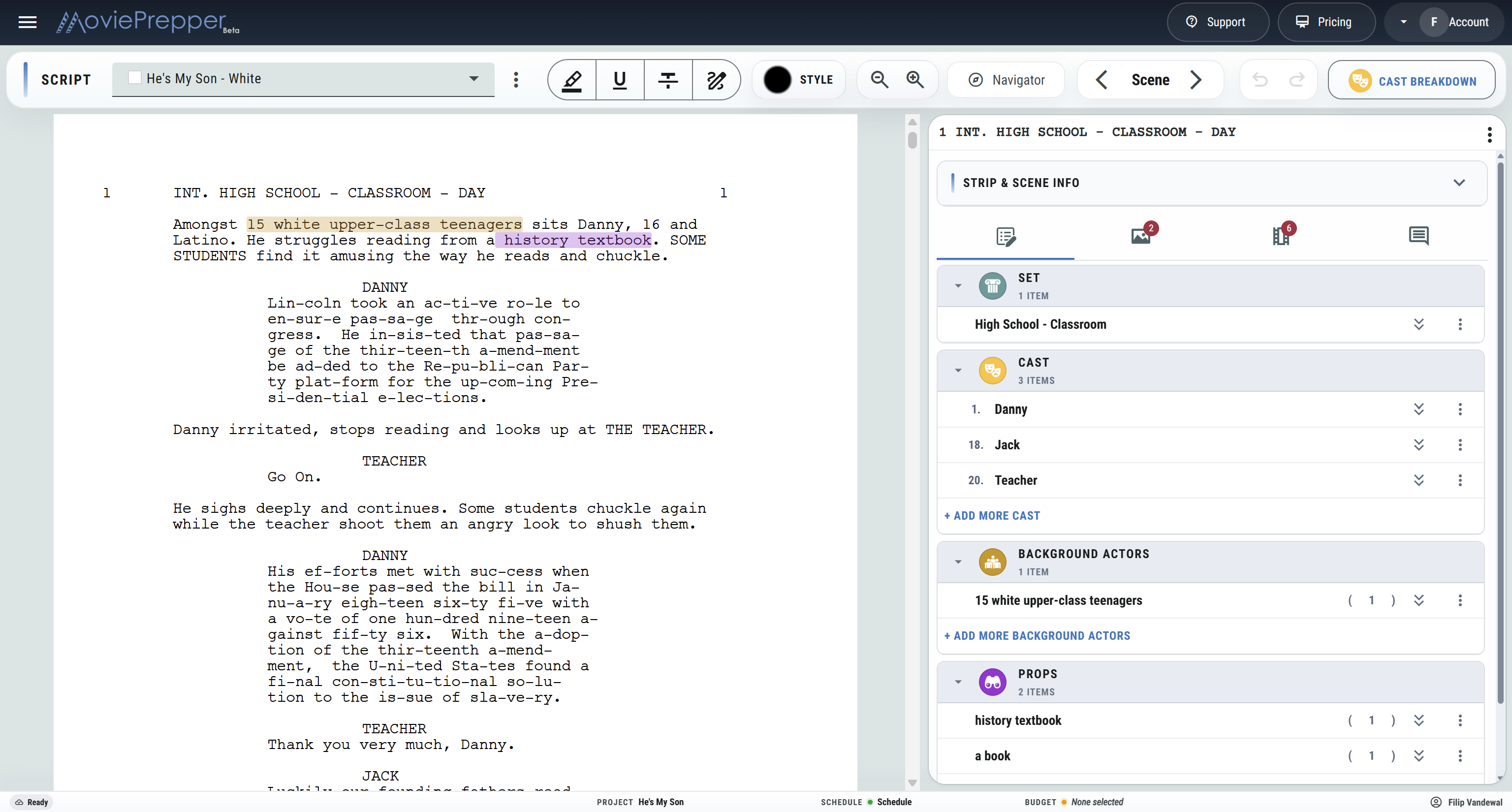
The shooting draft
Import the PDF, identify the first script page, name the episode or draft, set the revision color and date, and review the extracted scenes before making the schedule.
Import the PDF and name its title, episode, revision set, date, and script start page.
Check scene numbers, sluglines, page count, script days, sets, and time of day.
Add cast, elements, production tags, and scene notes.
Send scene information into scheduling, casting, locations, sides, shot listing, and call sheets.
While breaking down the script
Keep the information, elements, shots, visual references, and production questions together by scene.
Load the screenplay PDF, switch between drafts, and zoom the page while breaking down.
Review the scene number, partial, slugline, page number, page count, one-liner, and script day for every scene.
Track interior or exterior, set, location, and time of day for stripboard colors and the shooting schedule.
Jump to a scene from the navigator or move through the draft with Previous and Next controls.
Highlight, underline, strike through, or draw directly over the screenplay with adjustable color, thickness, and opacity.
Add cast, props, wardrobe, makeup, hair, sets, vehicles, background, animals, stunts, VFX, special equipment, and custom elements.
Flag practical requirements, risks, questions, and custom production needs on the selected scene.
Review cast roles across the draft with board IDs, role details, scene appearances, and casting information.
Correct sluglines and strip fields during the breakdown without leaving the selected scene.
Step backward or forward through local breakdown changes while working through the draft.
Prepare script and breakdown output for production meetings, department review, and the production binder.
Keep editing with the breakdown crew while other production roles can review the current scene information.
Strip and scene information
The breakdown sidebar carries the information an AD needs when the scene reaches the schedule. Correct the extracted details, write the one-liner, and establish story continuity before scenes begin moving between shoot days.
Department breakdown
A useful breakdown does more than count props. It tells departments what appears, where it works, and which scenes need questions answered before the tech scout, fitting, rehearsal, or shoot.
Revised pages
When revised pages arrive, load the updated PDF, identify its start page and revision set, review how scenes match, and keep the existing production information with the correct scenes.
From breakdown to the day
Once the script has been broken down, those strips and elements become working production information — not a separate report that has to be typed again.
Schedule scenes with their page count, set, cast, day/night, and production requirements already attached.
See which roles appear, how often they work, and the scenes tied to each role.
Connect sets and story locations to scouting, options, contacts, maps, and location prep.
List coverage scene by scene against the same shooting draft.
Pull selected scenes or the pages scheduled for a shoot day.
Bring the day’s scenes, cast, locations, and department information together.
Mark every production element, build the stripboard, and get the script ready for production.
Break Down a Script