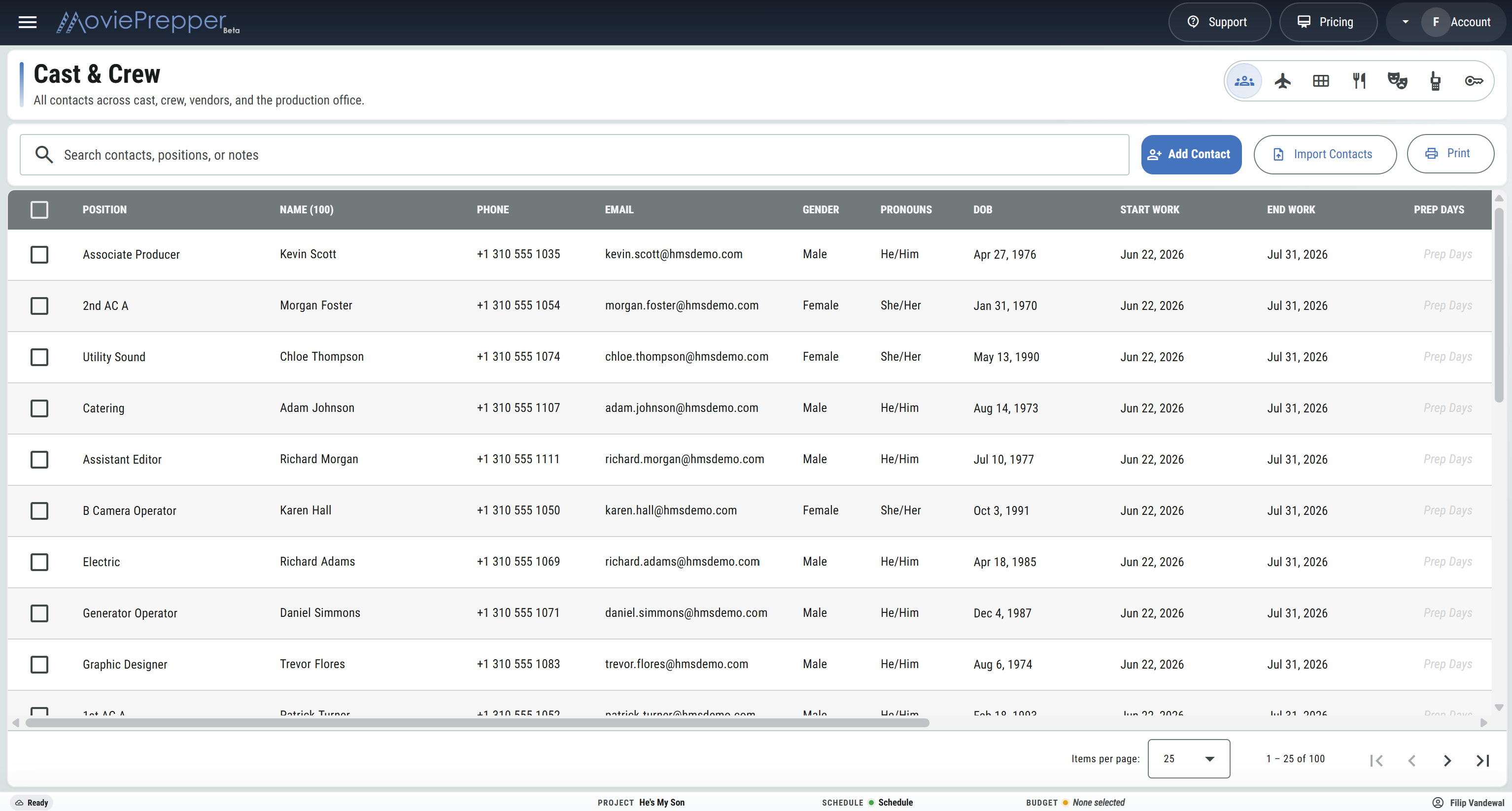
Build the list
Add contacts by hand, bring them in from your saved contacts, or import an XLSX crew list.
Cast & crew
Keep the names, positions, work dates, travel, food notes, documents, walkies, and project access that production needs from prep through wrap.
Start with a clear contact list, then use the same people for the roster, DooDs, call sheets, production reports, travel itineraries, and department work.
One working crew record
Add the person, assign the job, mark the dates, and keep the practical details beside the name. When the schedule changes or a new crew member comes aboard, production can make the change in the crew record and keep moving.
Add contacts by hand, bring them in from your saved contacts, or import an XLSX crew list.
Give each person one or more positions and add labels where the assignment needs more detail.
Mark starts, finishes, prep, shoot, wrap, hold, and travel days for the production.
Carry the crew into call sheets, production reports, travel pages, walkie lists, and other working paperwork.
Cast & crew features
Use the view that matches the job in front of you, while every view works from the same cast and crew list.
Keep names, phone numbers, email addresses, gender, pronouns, dates of birth, notes, and the contact details production needs.
Assign one or more positions to the same person and add a label when the crew assignment needs to be more specific.
Add a new contact, find someone in your saved contacts, or bring in an existing crew list from XLSX.
Track start and finish dates, prep, shoot and wrap day counts, travel status, union, and start paperwork.
Mark work, hold, and travel across the production calendar and read each person's work, hold, travel, and total day counts.
Keep flights, ground transportation, rental cars, housing, confirmation numbers, schedules, trip notes, and travel costs by person.
Record vegetarian, vegan and pescatarian needs, food restrictions, allergies, and catering remarks with the contact.
Keep cast roles, representatives, minor and guardian details, measurements, and continuity work connected to the performer.
Assign a walkie number to each person and prepare a walkie list for check-out, swaps, and returns.
Attach deal memos, forms, certificates, or other working documents to the person they belong to.
Invite collaborators and decide which production areas they can edit, view, or stay out of.
Mark a contact as sensitive and control who can see protected details separately from ordinary project access.
Find people by name, position, or notes, then sort the working list for the department or conversation at hand.
Use the crew list for daily calls, key crew on production reports, and phone or email visibility on issued paperwork.
Prepare crew, dietary, walkie, travel, and DooD pages with the people and columns needed for that copy.
Roster planner and DooDs
Lay the cast and crew against the production calendar. A quick pass shows when each person starts, works, holds, travels, and finishes—and the totals are already there when production needs them.
LAX to ABQ - SWA 214Aug 11, 8:20 AM - Seat 7A
CONF. K4LM2PSunport Rental CarPickup Aug 11 - Mid-size SUV
CONF. 80641Hotel ChacoAug 11-22 - King room
11 NIGHTSCrew travel
Build each traveler's itinerary from door to door. Flights, cars, drivers, lodging, housing allowances, confirmations, costs, and trip notes stay together so production can answer the practical questions quickly.
Crew access
Invite a crew member from the list and set their access by production area. A department head can edit their work, another crew member can view what they need, and private contact details can remain protected.
Crew ListPositions and contacts
Dietary NeedsCatering counts and notes
Walkie ListAssignments and returns
Travel ItineraryFlights, cars, and rooms
Day-out-of-DaysWork, hold, and travel
Email PDFSend the working copy
Production paperwork
The office may need phone numbers, catering needs a food count, the sound utility needs walkie assignments, and transportation needs itineraries. Choose the people and fields that belong on each copy.
Cast & crew FAQ
Yes. Add more than one position to the contact and use labels when the assignments need to be distinguished.
Yes. Import contacts from an XLSX file, add a new person, or pull someone from your saved contacts.
Yes. Crew contacts feed daily call sheets, and key crew and signatories can appear on production reports.
Yes. Keep flights, ground transportation, lodging, confirmations, and notes together, then print or email the itinerary.
Yes. Mark a person as sensitive and control access to their protected details separately.
Crew lists, dietary-needs lists, walkie lists, travel itineraries, and Day-out-of-Days pages can be printed or emailed as PDFs.
Build the cast and crew list, plan the dates, prepare the travel, and carry the right details into the working day.
Start Your Project