Film production call sheets

Call Sheets

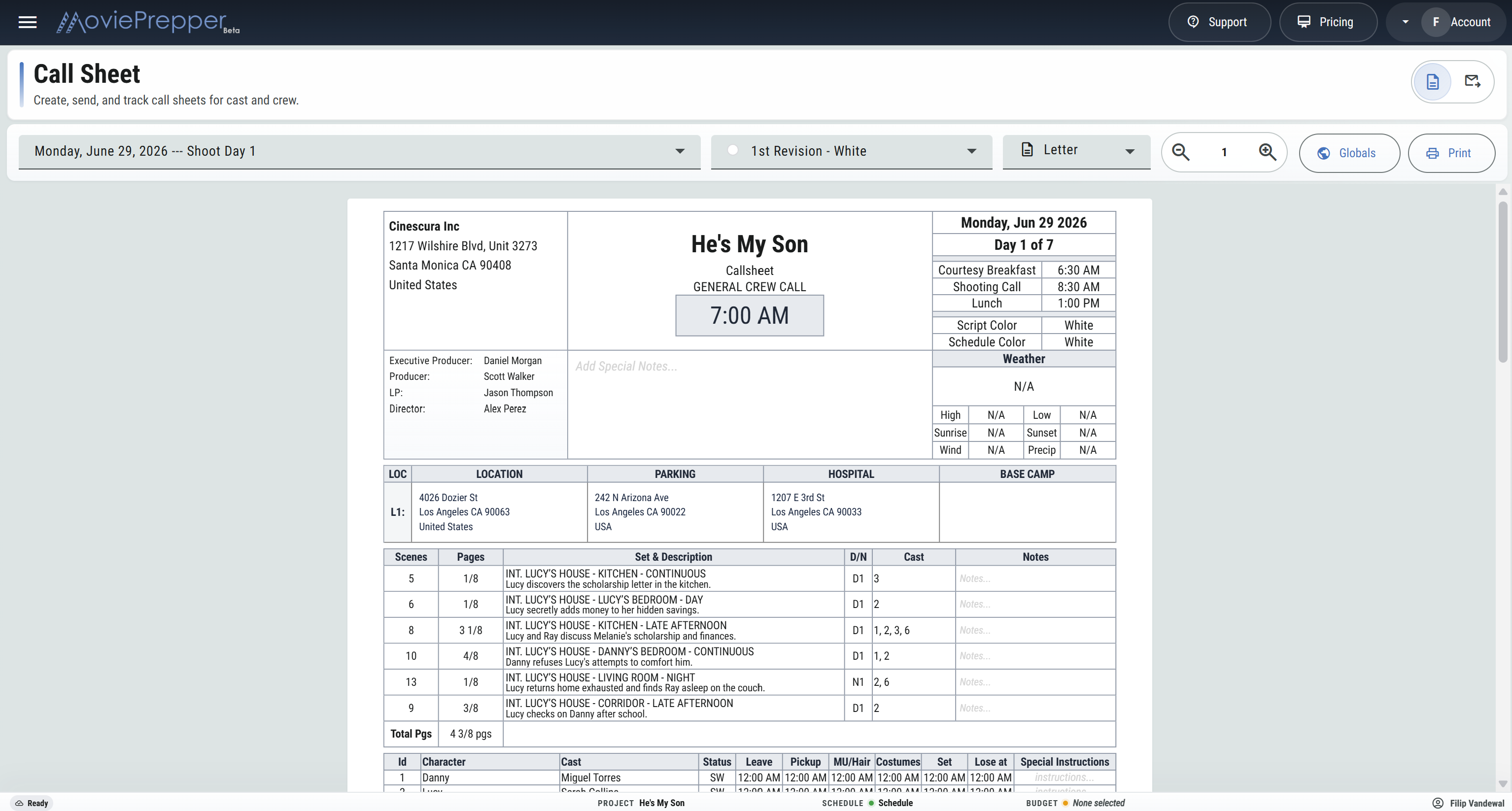
Start with the scheduled shoot day, then set crew and cast calls, confirm locations, check weather, arrange the day's scenes, and issue a call sheet built from current production information.

Keep the day's scenes, cast, background, stand-ins, crew, department instructions, catering, walkie channels, parking, base camp, hospital, sides, and attachments together from prep through distribution.

SECOND UNIT PICTURES
DESERT ROSECALL SHEET
THURSDAY, AUG 21
DAY 4 OF 18
GENERAL CREW CALL6:30 AM
NIGHT EXTERIORS · BRING WARM LAYERS
WEATHER72° / 51°Sunset 7:34 PMWind W 8 mph
LOC 1OLD BUS TERMINALCrew parking on Alameda · Base camp south lot
31EXT. BUS TERMINAL - NIGHT3/8 · Cast 1, 3
32INT. TERMINAL WAITING AREA - NIGHT1 2/8 · Cast 1, 3, 6

From the board to the crew

Begin with the day production already scheduled

Select a shoot day and bring its scenes, date, cast, sets, page counts, schedule color, contacts, and locations into the daily call. Production can then make the day-specific adjustments before anything is printed or sent.

01

Select the day

Open a scheduled shoot day and choose the call-sheet revision color and paper size.

02

Set the calls

Establish general crew call, breakfast, shooting call, lunch, cast movement, background, stand-ins, and departmental crew calls.

03

Check the day

Review scenes, pages, locations, parking, base camp, hospital, weather, notes, catering, and department instructions.

04

Issue and track

Print the PDF or send it to selected recipients with sides and attachments, then follow views and confirmations.

The daily production document

Build the call around the work actually scheduled

Every section can be prepared for the specific shoot day without retyping the production's existing breakdown, schedule, contacts, and locations.

Day timings

Set general crew call, courtesy breakfast, shooting call, and lunch in either 12-hour or 24-hour production time.

Revision colors

Issue prelim, white, blue, pink, and later call-sheet revisions with the revision color visible on the document.

Production identity

Use the production company information, company logo, title artwork, project name, and selected key personnel.

Special notice

Place the day's most important crew notice prominently near the top of the call sheet.

Shoot-day weather

Pull conditions from the first call-sheet location with a city, including high, low, sunrise, sunset, wind, and precipitation.

Working locations

Select locations from the production library and show separate addresses and instructions for set, crew parking, hospital, and base camp.

Today's scenes

Bring in scheduled strips with time, episode, scene, pages, set, one-liner, script day, cast IDs, and notes.

Editable scene order

Reorder or remove scenes, add strips from the library, create a pickup strip, or insert a production banner directly on the call.

Cast movement

Prepare cast status, leave, pickup, makeup and hair, costume, on-set, lose-at, and special-instruction fields.

Stand-ins and background

Add stand-ins with call and on-set times, then list background by quantity, description, call, and on-set time.

Crew by department

Carry the crew list into department groups and set individual leave and call times for the day.

Next-day work

Show the following day's scenes and locations, with additional overflow pages when the production needs more room.

Scheduled scenes and breakdown elements

Control what the crew sees without breaking the stripboard

The call sheet starts from scheduled strips, but the day's document can be adjusted for late changes, pickups, splinter work, or a revised running order. Choose the visible columns and the scene elements that belong in cast, background, or department sections.

  • Reorder the day's strips for the issued call.
  • Add existing scenes, a newly entered strip, or a banner.
  • Show or hide time, episode, script day, cast IDs, and notes.
  • Select cast, background, and department elements by scene.
  • Carry total screenplay pages on the day's scene section.
TIMESCPGSSET & DESCRIPTIONCAST
7:00313/8

BUS TERMINALAva arrives before dawn.

1, 3
8:15321 2/8

WAITING AREAThe driver spots the red coat.

1, 3, 6
10:30335/8

PLATFORMAva boards as police arrive.

1, 8
TOTAL PAGES2 2/8
L1 · OLD BUS TERMINALDowntown Unit
LOCATION901 Alameda Street
Los Angeles, CA
Enter through north gate.
PARKINGSouth Crew Lot
820 Alameda Street
Shuttle begins 5:15 AM.
HOSPITALCounty Medical Center
1200 State Street
Emergency entrance on Mission.
BASE CAMPWarehouse Lot B
845 Alameda Street
HMU and wardrobe trailers.

Set, parking, hospital, and base camp

Give every destination its own address and arrival note

A shooting location is not the same as crew parking or base camp. Select the locations working that day and decide which address markers should appear on the issued call sheet.

  • Use an existing production location or add one for the day.
  • Maintain separate location, parking, hospital, and base-camp markers.
  • Add gate, shuttle, access, arrival, and parking instructions.
  • Show or withhold each address from the printed call.
  • Use a location city to update the shoot-day forecast.

Cast, crew, and department calls

Prepare the movement of people, not just a general call

Use the scheduled scenes to build the cast and background sections, then make the individual adjustments production needs for the day.

Cast

List character and performer with status, leave, pickup, makeup/hair, costume, on-set, lose-at, and special instructions.

Stand-ins and background

Add stand-ins from contacts and select background elements from scheduled scenes, with quantities and individual working times.

Crew

Group contacts by department and position, add or remove people for the shoot day, and set individual leave and call times.

Department instructions

Select scene elements by department and show the scenes where each requirement works, with notes for the department.

Catering

Add meal servings, head counts, ready-to-serve times, and dietary totals for vegetarian, vegan, allergies, and other restrictions.

Walkies

Publish channel assignments for up to ten channels so departments know where production traffic belongs.

Call sheet delivery

Issue the PDF to the people working the day

Move from the prepared document into a delivery list built from project contacts, cast, background, and crew. Select the recipients, check their calls and contact information, attach the day's files, and send one revision of the call.

  • Select everyone or only recipients who have a call time.
  • Search, add, or correct contacts before sending.
  • Edit the email subject and production message.
  • Upload supporting files or attach the saved sides packet.
  • Send to the selected list or resend to one recipient.
  • See sent, viewed, and confirmed status for the latest issue.
42 Available38 Selected34 Viewed30 Confirmed
RECIPIENTCALLSTATUS
Maya Chen 1st AD5:45 AMConfirmed
Jon Bell Key Grip6:00 AMViewed
Elena Ruiz Cast · Ava7:15 AMSent

PDF and paper

Review the same document production will receive

Zoom the call-sheet preview while working, choose Letter, Legal, or A4 output, and print the prepared pages as a PDF. Longer calls can carry scene overflow and department crew pages without forcing the day into a one-page template.

Call sheet FAQ

Questions from the production office

Where does a new call sheet begin?

Select a shoot day from the current schedule. Its date, scenes, cast, sets, page counts, and production information become the starting point.

Can I change the scene order on the call sheet?

Yes. Reorder or remove scheduled scenes, add scenes from the strip library, enter a new strip, or add a production banner.

Can individual cast and crew calls be adjusted?

Yes. Set cast movement times, stand-in and background calls, and individual crew leave and call times for the selected day.

Can sides and other files go with the call?

Yes. Attach the saved sides packet for that shoot day and upload other production files before sending the call-sheet PDF.

Can production see who received the call?

The latest distribution shows recipient count and the sent, viewed, and confirmed status recorded for each recipient.

Which page sizes are available?

Prepare and print the call sheet in Letter, Legal, or A4 format, with zoom controls for the working preview.

Make tomorrow's call from today's production plan.

Set the calls, check the locations and weather, prepare the crew document, attach the sides, and know who has confirmed.

Start Your Project